Pelican 1-Click Template —
one server, 400+ games,
no slot fees
Pelican comes fully pre-installed on your SERVER4YOU server via our Ubuntu template. Pick your egg, invite your friends and start playing — no per-slot charges, no restrictions on mods or configs, no dependency on a single admin.
- 1-Click Pelican Template
- Pre-installed on Ubuntu
- No per-slot fees
- Open-Source & Free

Recommended servers
Servers for Pelican
Pelican needs at least 6 GB RAM to run smoothly. A VPS is a great start for your friend group – for large communities, many parallel game servers or a hosting business, a dedicated server gives you more RAM and dedicated CPU cores.
VPS Professional
- 4 vCore
- 8GB RAM DDR5 ECC
- 100 GB NVMe SSD
- 100 MBit/s
- St. Louis (USA) · Strasbourg (FR)
VPS Elite
- 6 vCore
- 32GB RAM DDR4 ECC
- 2 TB HDD
- 100 MBit/s
- St. Louis (USA) · Strasbourg (FR)
E-2286G NVMe
- 6 cores, 12 threads, 4,00 GHz
- 64 GB DDR4 ECC
- 2 x 1TB NVMe SSD
- St. Louis (USA) · Strasbourg (FR)
Use cases
What can you do with Pelican?
From a survival server for your friends to a hosting setup for a whole community: Pelican manages all your game servers in one modern panel.
For gamers & communities
Your own game servers – without slot fees.
Friend group & clan server
Create accounts for your friends so they can restart, update or open the console themselves – without your password.
Multi-game community
Switch between titles anytime by swapping the egg – same server, same players, no extra cost.
Mods & plugins
Install any mod, modpack or plugin with full root access – no blacklists, no approval.
Your own rules
Decide on wipes, whitelists and server settings yourself – no forced resets by a hosting provider.
For hosting projects
Grow from one server to a full hosting setup.
Game hosting service
Provide game servers to your customers or community members and manage all instances in one panel.
Multi-node setup
Register several VPS or dedicated servers as nodes and distribute game servers across them.
Esports & events
Run servers for tournaments, leagues and LAN events with full control over every configuration.
Scale with your players
Keep a fixed monthly price no matter how many players join – add nodes when your community grows.
What is Pelican?
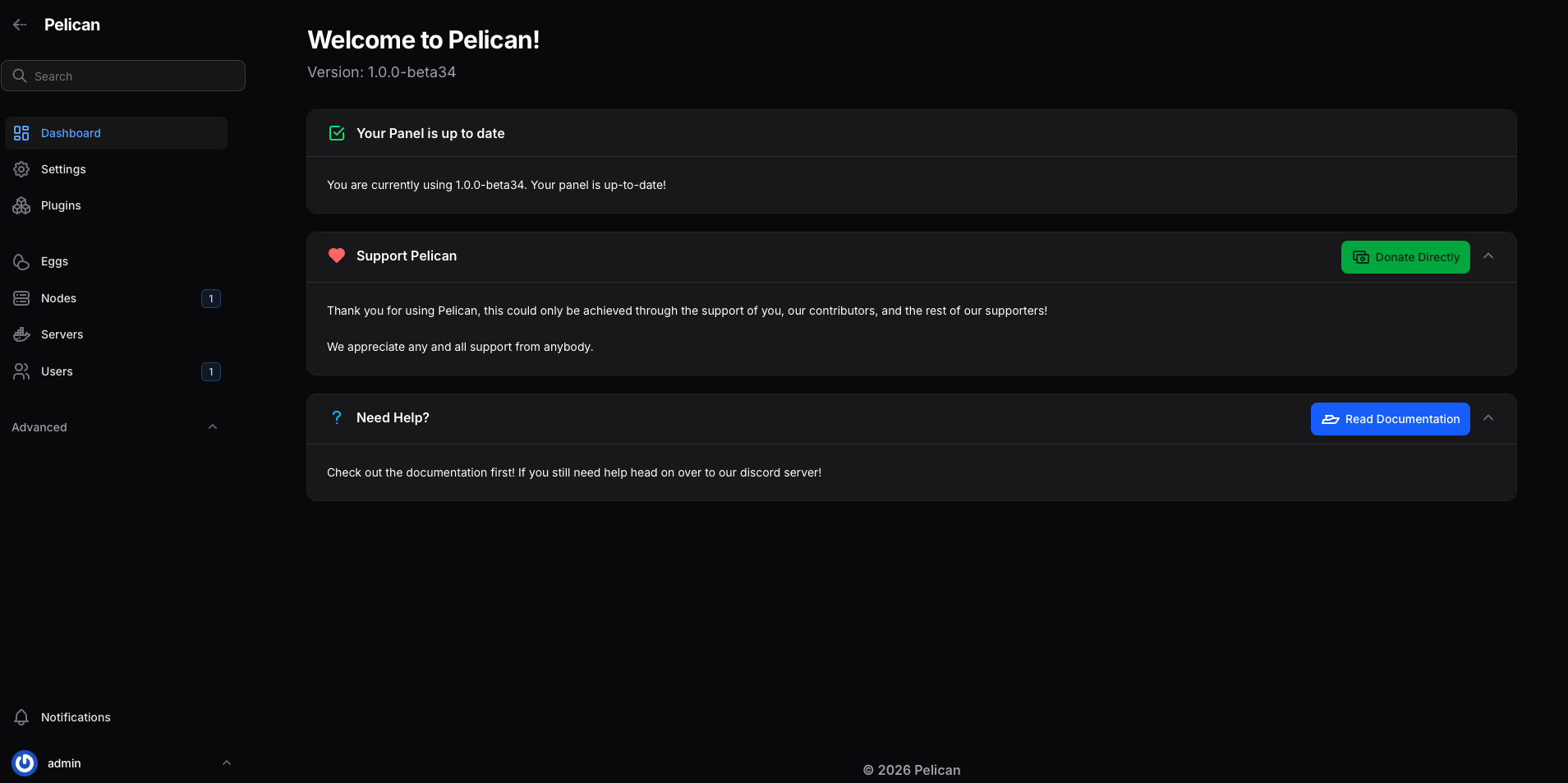
Pelican is a free, open-source game server management panel and the modern successor to Pterodactyl. Every game server runs in its own isolated container and is managed through a web interface that opens directly via your server IP.
- 400+ game eggs
- Subusers
- Multi-node
- File manager
- Scheduled tasks
- Browser access via IP

Pre-installed template
Choose our Pelican template on Ubuntu – the panel is installed automatically during deployment.
No slot fees
Pay a fixed monthly price for your server and run as many game servers as your hardware supports.
SETUP
From order to first game server in 4 steps
- 1
Choose a server
Pick a VPS for your friend group or clan — or a Dedicated Server for large communities, multi-game setups or a professional game hosting business with multiple nodes.
- 2
Select the Pelican template
Choose our pre-built Pelican template during setup. Available for Ubuntu. The panel is installed and configured fully automatically — no manual steps required.
- 3
Open the panel in your browser
Your Pelican Panel is immediately accessible in the browser via your server IP right after deployment — no domain, no reverse proxy, no waiting. Log in and you're ready to go.
- 4
Download your egg & go live
Download the egg for your game — Minecraft, Rust, Palworld, CS2, Hytale and hundreds more. Set resources, invite subusers and launch your server instantly.
CONTROL
Full control.
For you and
your whole crew.
- Pre-installed 1-Click Template — Pelican running from minute one, no setup required.
- Subuser system — give friends or clan members specific rights like restart, update or console access without sharing your admin password.
- Switch games anytime — just swap the egg. No new server, no extra cost, no re-inviting your team.
- No forced wipes — you decide when Rust, ARK or any survival world gets reset.
- Full mod freedom — install any plugin, modpack or custom configuration without restrictions.
- Direct browser access via IP — no domain or reverse proxy needed.
- Real-time resource monitoring for CPU, RAM and disk per server instance.
- No Pelican license fees — open-source and free forever.
INFRASTRUCTURE
Built for game servers that never sleep

NVMe SSD Storage
Ultra-fast disk I/O for lightning-quick game server startups, map loads and mod installations — even under sustained load with multiple active servers.

DDR4 / DDR5 Memory
Enough RAM to run multiple game servers in parallel — without throttling, without performance loss, no matter how many players are online.

High-Performance vCores
Stable, consistent performance for CPU-heavy games — even with many concurrent players and heavily modded environments under sustained load.
Up to 1 Gbit/s connectivity
Fast, stable network connection for low-latency gameplay – 100 Mbit/s flatrate on VPS and up to 1 Gbit/s on dedicated servers.
EU & US Data Centers
Strasbourg (FR) and St. Louis (USA) — choose the location closest to your players for minimum ping and the best possible gaming experience.
24/7 Support
Our support team is available 24/7 for hardware and network issues – with a first response within 30 minutes. Your game servers stay online around the clock.
One server. Hundreds of supported games. Your community — always online.